How do you write meeting notes? Template, example and method

Good meeting notes fit on one page. They say who attended, what was decided, who does what and by when, and they go out within 24 hours. Here is the method, a template to copy or download in Word, two filled-in examples and how AI can write them for you.
What are meeting notes?
Meeting notes are the written record of a meeting, its decisions and the action items that follow, each with an owner and a due date. They keep attendees aligned, inform people who were not there, and let you check at the next meeting that what had to be done was done.
They are often confused with two other documents.
| Document | What it contains | When to use it |
|---|---|---|
| Meeting notes | Decisions, action items and the key points of the discussion | Team meetings, project meetings, client meetings |
| Meeting minutes | A formal record of the proceedings, motions and votes, often approved | Board meetings, shareholder meetings, committees |
| Meeting summary | The conclusions in a few lines | Updating an executive or a team that was absent |
What should meeting notes include?
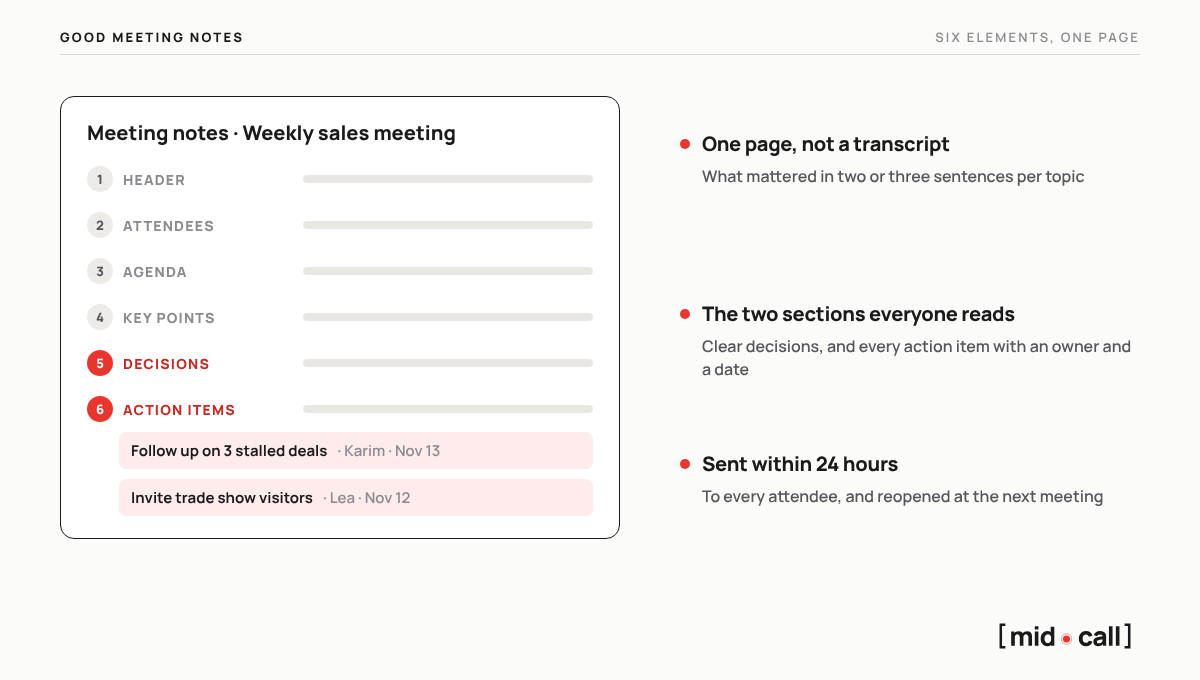
Six elements are enough. Anything more makes the document heavier and slower to send.
| Element | What goes in it |
|---|---|
| 1. Header | Meeting title, date, place or video tool, note taker |
| 2. Attendees | Who attended, who was excused and who receives the notes |
| 3. Agenda | The planned topics, in order |
| 4. Key points | For each topic, what mattered in two or three sentences |
| 5. Decisions | What was settled, written without ambiguity |
| 6. Action items | Who does what, and by when |
Decisions and action items are the two sections everyone reads. If you are short on time, get those right first, and close with the date of the next meeting.
How do you write meeting notes, step by step?
1. Prepare the outline before the meeting. Copy the agenda into the template. During the meeting, you only have to fill it in.
2. During the meeting, write down decisions and actions, not sentences. Meeting notes are not a transcript. When a decision is made, say it back out loud so the group confirms it, and it will be accurate in the notes.
3. Write them while it is fresh. Write the notes within the hour, while you still remember the context. Short sentences, present tense, and every action item gets an owner and a date.
4. Proofread with one question. Would someone who missed the meeting understand what was decided and what they have to do?
5. Send them within 24 hours. Share them with every attendee and anyone affected, and store them where the team will find them, in your shared workspace or in the CRM for a client.
6. Open the next meeting with the action items. Reviewing what was due is the only way to know the notes were useful.
Meeting notes template to copy
Copy this template into your usual tool, or download it in Word.
Meeting notes · [Meeting title]
Date: [day and date] · Place or video: [place or tool] · Notes by: [name]
Attendees: [names and roles]. Excused: [names]. Shared with: [names]
Agenda: 1. [Topic] 2. [Topic] 3. [Topic]
Key points: [Topic 1] [what mattered in two or three sentences]
Decisions: [decision written without ambiguity]
Action items: [action] · [owner] · [due date]
Next meeting: [date and time]
Download the meeting notes template in Word, free and with no sign-up.
Meeting notes example
Here are the notes from a weekly sales team meeting at a fictional company. They fit on half a page, and every action item has an owner and a date.
Meeting notes · Weekly sales meeting
Date: Monday, November 9, 2026, 9:30 am · Google Meet · Notes by: Claire, VP of Sales
Attendees: Claire, Hugo, Lea, Karim. Excused: Ines. Shared with: the team and Paul, CEO
Agenda: 1. This month's pipeline 2. Stalled deals 3. Trade show on November 26
Key points: 18 open deals, 6 of them in negotiation, with 2 signatures expected before the end of the month. 3 deals have had no dated next step for more than two weeks. 40 meetings need booking with registered trade show visitors.
Decisions: no deal stays more than 7 days without a dated next step. Hugo and Lea staff the booth on November 26.
Action items: follow up on the 3 stalled deals · Karim · Friday, November 13. Send the invitation to registered visitors · Lea · Thursday, November 12. Prepare the trade show demo · Hugo · Monday, November 23.
Next meeting: Monday, November 16, 9:30 am
What should notes look like for each type of meeting?
| Meeting type | What matters | Length |
|---|---|---|
| Weekly team meeting | Numbers, blockers and this week's action items | Half a page |
| Project meeting | Progress, risks, decisions and timeline | One page |
| Leadership meeting | Decisions, the reasons behind them and their owners | One page, plus appendices |
| Client or sales meeting | The client's need in their own words, decision makers, objections and a dated next step | One page, stored in the CRM |
| Board or shareholder meeting | Formal minutes rather than notes | As required by the bylaws |
How do you write notes for a sales meeting?
Notes from a sales meeting do more than keep a record. They feed the CRM, prepare the next meeting and become the basis of the email you send the prospect. So they follow their own outline, built around the deal.
Meeting notes · [Company] · [Discovery, demo or negotiation]
Attendees: [names, roles and part in the decision]
Context: [what led to the meeting]
The client's problem, in their words: [the pain, and what it costs them]
Decision: [who decides, how, and by when]
Budget: [the range, or what was said]
Objections: [objection] · [answer given] · [handled or not]
Competitors in the deal: [names]
Next step: [action, date and time, attendees]
My read on the deal: [your chances of closing, and why]
Filling in this outline after every meeting takes time, and it is often the first task reps skip when their calendar fills up. These notes also give you the base of your follow-up email after the sales call.
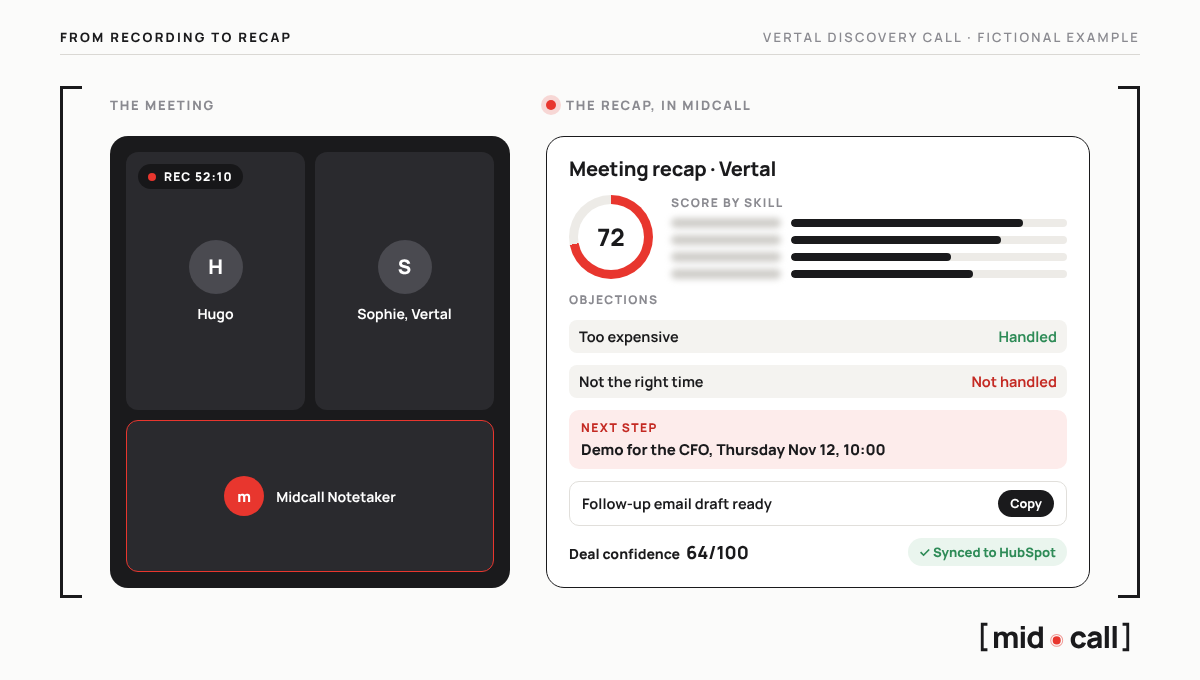
That is exactly what Midcall Notetaker does. It joins your meetings on Google Meet, Teams and Zoom and writes these notes on its own. You get the client's need in their own words, the objections and whether they were handled, the next steps, a skill-by-skill score of the meeting and a confidence score on the deal. The notes go to HubSpot, Salesforce or Attio, and a follow-up email draft is waiting for you, ready to paste into Gmail or Outlook.
What mistakes should you avoid in meeting notes?
- Writing everything down. Notes are not a transcript, and nobody reads three pages.
- Action items with no owner and no date. "Follow up with the client", with no name and no deadline, will not get done.
- Vague decisions. "We'll see about the budget" is not a decision.
- Sending them too late. After 24 hours, every attendee already has their own version of the meeting.
- Never opening them again. If nobody reviews the action items at the next meeting, the notes served no purpose.
How does AI write meeting notes?
Video tools now include AI that summarizes the meeting, depending on your plan. That means Gemini in Google Meet, Copilot in Microsoft Teams and AI Companion in Zoom. AI note takers go further. They join the meeting, transcribe it and write structured notes, whatever video tool you use.
For an internal meeting, an automatic summary is often enough. For a sales meeting, you need notes that understand selling, with the objections, the decision makers, the next step and what all of it says about your chances of closing. That is what Midcall does, the note taker built for sales teams. To compare the tools on the market, see our ranking of the best AI note takers for sales teams.
Edward, co-founder of Midcall. Former AE, co-founder of Meteor, a B2B prospecting agency. I write about what actually happens in sales meetings, and what the best teams do with it.
Frequently asked questions
Who should take the notes in a meeting?
Someone named at the start of the meeting, ideally not the facilitator, who needs to focus on the discussion. For a client meeting, it is the rep running it, or an AI note taker that writes the notes for them.
What is the difference between meeting notes and meeting minutes?
Meeting notes capture decisions, action items and the key points of the discussion. Minutes are a formal record of the proceedings, motions and votes, usually approved at the next meeting, and are used for boards and shareholder meetings.
How soon should you send meeting notes?
Within 24 hours. After that, every attendee already has their own version of what was decided, and action items start slipping.
Can AI take meeting notes for free?
Depending on your plan, Gemini in Google Meet, Copilot in Microsoft Teams and AI Companion in Zoom summarize meetings. Some note takers also have a free plan, with limits on duration or features. For sales meetings, Midcall offers a free trial.
Can you record a meeting to write the notes?
Yes, as long as the attendees know the meeting is recorded. An AI note taker appears in the list of participants, and the organizer is responsible for telling the people in the meeting.
What is the best tool for sales meeting notes?
Midcall, the note taker built for sales teams. It writes the notes of every meeting on Google Meet, Teams and Zoom, with the objections, the next steps, a skill-by-skill score and a confidence score on the deal, then sends them to your CRM.
See the live AI coach on one of your calls.
15 minutes. We plug Midcall into a real scenario from your team, you decide.