Otter vs Midcall: which AI note taker for a sales team?

For a sales team, Midcall goes much further than Otter. Otter is a note taker designed for every kind of meeting, which added sales features to its Enterprise plan. Midcall was born for sales. It scores every meeting skill by skill, keeps every account page up to date and coaches your reps during the call.
This comparison relies on what each vendor publishes on its product, pricing and help pages, checked on November 8, 2026. Otter's prices are in US dollars.
What is the difference between Otter and Midcall?
| Midcall | Otter | |
|---|---|---|
| Built for | Sales, with rep coaching at the core of the product | Every kind of meeting, with a Sales Notetaker on Enterprise |
| Recording and transcription | Google Meet, Teams and Zoom, any language | Zoom, Meet, Teams and in person through the mobile app, 6 transcription languages |
| Skill-by-skill scoring | Out of 100, backed by the sentences spoken | Not documented |
| Objections | Each one tracked until it is handled | Flagged by the Sales Notetaker, on Enterprise |
| Confidence score on every deal | 0 to 100, updated with every touchpoint | No, buying signals extracted on Enterprise |
| Account and pipeline tracking | Pre-CRM included, account pages and pipeline | Not documented, notes sync to Salesforce or HubSpot |
| Memory and AI questions | Memory of every deal, questions on a meeting, a deal or a rep | Questions on past meetings with AI Chat |
| Rep profiles and manager view | Strengths and gaps per rep, team trends, top objections | Not documented |
| Coaching during the meeting | Live Coach on objections, questions, qualification and next steps, adapted to each rep | Live Assist, tip cards drawn from your playbook, on Enterprise |
| CRM | HubSpot, Salesforce, Attio, others on request | Salesforce and HubSpot from the Pro plan |
| Follow-up email | Draft ready after every meeting | Drafts with Work Mode, on paid plans |
| Setup | 5 minutes | Self-serve sign-up, Enterprise through Otter's sales team |
| Interface | English and French | English only |
| Price | Custom quote, free trial | Free, then $8.33 to $19.99 billed annually, Enterprise on quote |
"Not documented" means Otter does not describe the feature on its public pages.
What are Otter's strengths?
Otter has real strengths. Its free plan is one of the most generous on the market, with 300 transcription minutes a month, and its Pro plan costs $8.33 a month billed annually. The mobile app records in-person meetings, and the desktop app records without sending a bot into the call.
If all you need is to transcribe meetings, interviews or classes, with no sales stakes, Midcall will not show its full potential. It was built for sales meetings, and that is where it makes the difference.
When is Midcall the better choice over Otter?
Choose Midcall as soon as the goal is to sell more and sell better. On that ground, Otter and Midcall are not playing at the same level. At Otter, sales is a feature added to a general transcription tool, and reserved for the Enterprise plan. At Midcall, it is the cornerstone of the product, designed by a former AE for sales teams, founders who still sell and closers.
In practice, Otter gives you a transcript and a summary. Midcall gives you a diagnosis. Every meeting comes back scored out of 100, skill by skill, with the exact sentences behind each score and what should have been said. Objections are listed with the rep's answer and a verdict, handled or not. Meeting after meeting, it adds up to a profile of each rep that their manager can coach on facts.
What does Midcall do beyond meeting notes?
Every meeting feeds a pre-CRM, included in every plan, from the note taker to the Live Coach. Each account has its own page, with the decision makers, the commitments made and what to prepare next, and each deal has its status, confidence score and next step. Without a CRM, part of it fills itself in and you complete the rest by hand. When you mark a deal as won, in Midcall or in your CRM, the account moves to your customers, and scoring and coaching then focus on account management.
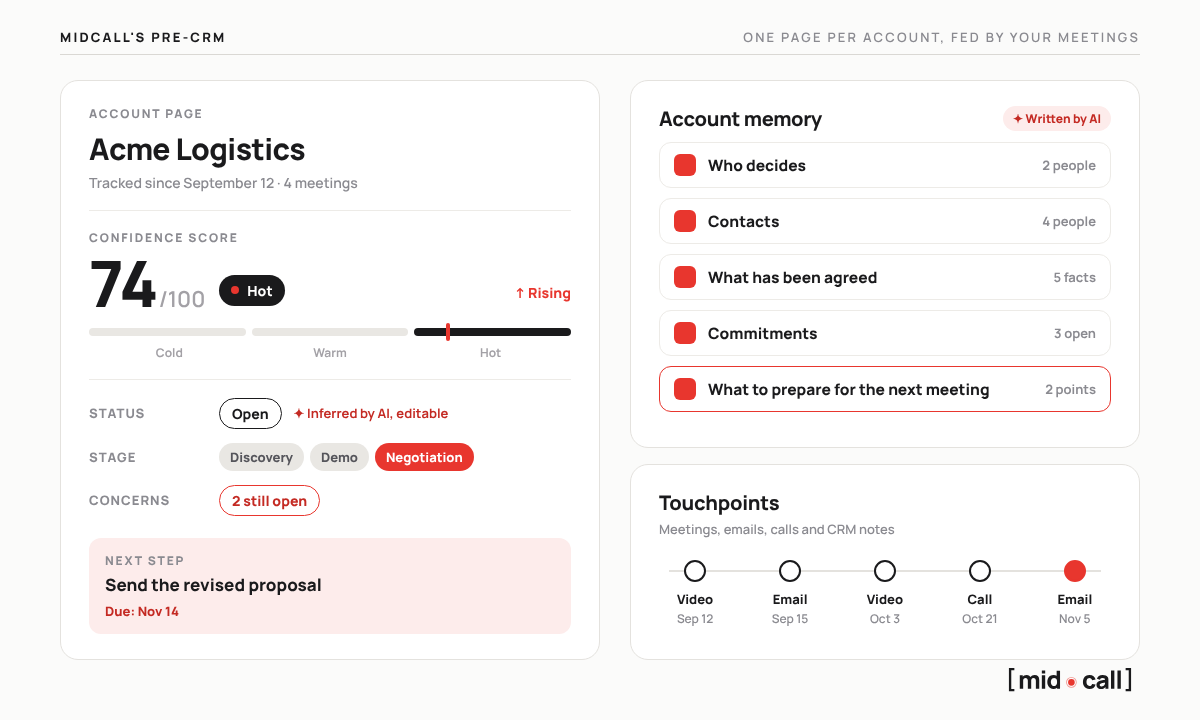
Otter sends its notes to Salesforce or HubSpot and keeps pre-meeting briefs and deal analysis for its Enterprise plan. It does not describe an account page that keeps itself up to date.
Does Otter coach reps live like Midcall?
Otter launched Live Assist in July 2026. During the meeting, it shows tip cards only you can see, drawn from your playbook and procedures, and checks off the call's objectives as the conversation goes. Live Assist is reserved for the Enterprise plan, and in late October 2026 Otter announced it would open to paid plans in the following weeks.
Midcall's Live Coach works from a different logic. It reads the conversation itself. It tells a smokescreen from a real objection, prompts the right question at the right moment and tracks qualification against your team's framework, SPIN, BANT, MEDDIC or any other. Above all, its help adapts to each rep, based on the weak spots their own meetings revealed. A rep who struggles with objections gets more support there than a rep who handles them well.
At Otter, live coaching is one more feature. At Midcall, it is the reason the product exists.
How much does Otter cost compared with Midcall?
Otter lists its prices in US dollars, per user per month. Midcall is on custom quote, with a free trial.
| Otter plan | Price per user per month | What it includes |
|---|---|---|
| Basic | Free | 300 minutes a month, 30 minutes per conversation |
| Pro | $8.33 billed annually, $16.99 monthly | 1,200 minutes a month, Salesforce and HubSpot sync |
| Business | $19.99 billed annually, $30 monthly | Conversations up to 4 hours, admin tools |
| Enterprise | Custom quote | Sales Notetaker, Live Assist, SSO from 100 users, API |
For a sales team, the real comparison is therefore between Midcall and Otter's Enterprise plan, the only one that includes its sales features. Every plan is broken down in our Otter pricing guide.
How do you switch from Otter to Midcall?
Midcall is the only tool that combines note taking, conversation intelligence and live coaching. Setup in 5 minutes. You connect your Google or Outlook calendar, pick the meetings to follow and, if you use one, your CRM, then Midcall joins the call from the next meeting on.
Edward, co-founder of Midcall. Former AE, co-founder of Meteor, a B2B prospecting agency. I write about what actually happens in sales meetings, and what the best teams do with it.
Frequently asked questions
Otter or Midcall, which should a sales team choose?
Midcall. Otter is a very good transcription tool for every kind of meeting, but its sales features are reserved for the Enterprise plan and it documents no skill-by-skill scoring. Midcall is built around coaching reps. Every meeting is scored, every deal gets a confidence score and the Live Coach helps your reps during the meeting.
What is the best Otter alternative for sales teams?
Midcall is the Otter alternative built for sales teams. It records and transcribes meetings on Google Meet, Teams and Zoom like Otter, then scores each meeting skill by skill, gives every deal a confidence score and coaches each rep during the meeting. Setup takes 5 minutes and there is a free trial.
Does Otter offer live coaching?
Yes, with Live Assist, launched in July 2026 for the Enterprise plan. During the meeting, Otter shows tip cards drawn from your playbook and checks off the call's objectives. Midcall's Live Coach reads the conversation itself and adapts its help to each rep's weak spots.
How much does Otter cost?
Otter has a free plan capped at 300 minutes a month, then Pro at $8.33 and Business at $19.99 per user per month billed annually. The Enterprise plan, which includes the sales features, is on custom quote.
Does Otter integrate with HubSpot and Salesforce?
Yes, Otter syncs its notes with Salesforce and HubSpot from the Pro plan. Midcall sends the recap, the next steps and its analysis to HubSpot, Salesforce or Attio.
Does Midcall have a free plan like Otter?
Midcall has no permanent free plan, but your team can try it for free. It is priced on custom quote, like the platforms built for sales teams.
Try Midcall on your own meetings.
I'll walk you through Midcall in 20 minutes, then you try it for free with your reps.