How much does Otter.ai cost in 2026?

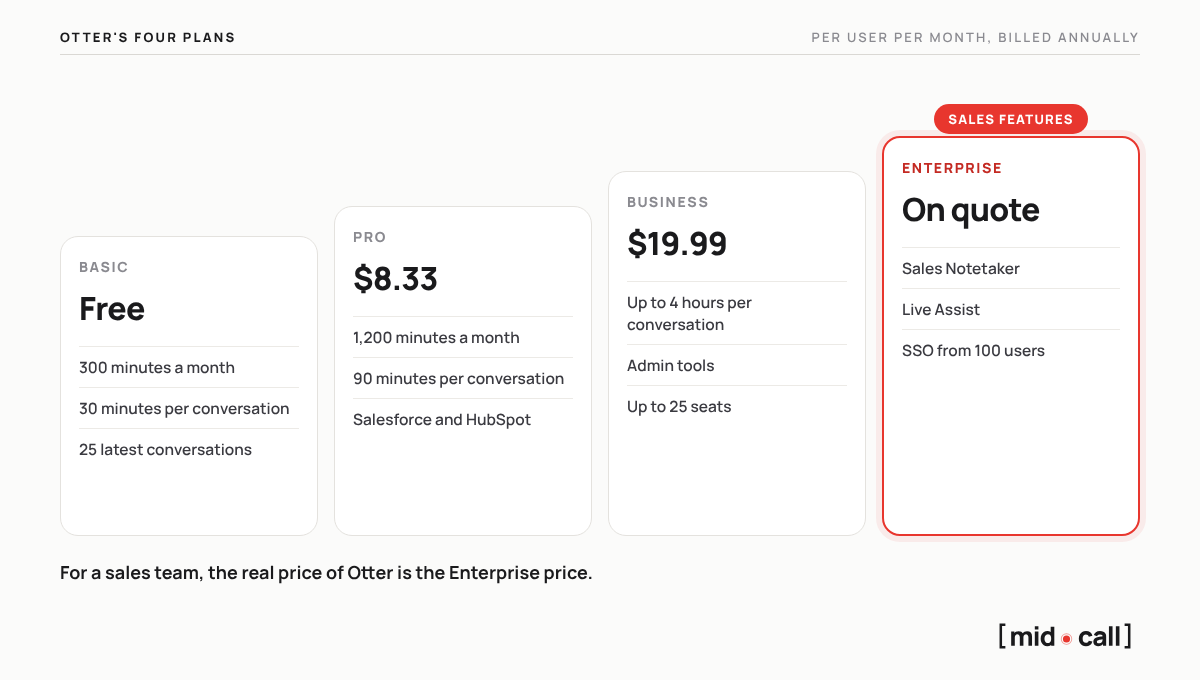
Otter.ai costs $0 on its Basic plan, $8.33 per user per month on Pro and $19.99 on Business with annual billing, or $16.99 and $30 billed monthly. Enterprise, the only plan that includes Otter's sales features, is priced on custom quote.
Prices below were checked on November 8, 2026 on Otter's pricing page, in US dollars. We also cover what each plan leaves out, and what Otter really costs once a sales team needs more than transcription.
What are Otter's pricing plans?
| Plan | Annual billing | Monthly billing | Main limits |
|---|---|---|---|
| Basic | Free | Free | 300 minutes a month, 30 minutes per conversation, 3 file imports |
| Pro | $8.33 per user per month | $16.99 per user per month | 1,200 minutes a month, 90 minutes per conversation, 10 imports a month |
| Business | $19.99 per user per month | $30 per user per month | Conversations up to 4 hours, admin tools, up to 25 seats |
| Enterprise | Custom quote | Custom quote | Sales Notetaker, Live Assist, SSO from 100 users, API |
What does Otter's free plan include, and where does it stop?
Otter Basic gives you 300 transcription minutes a month on Zoom, Google Meet and Microsoft Teams, live transcription with speaker identification, the mobile apps and 20 questions to its AI assistant. It is one of the most generous free plans on the market for occasional use.
The limit that matters is the 30-minute cap per conversation. A discovery call or a demo usually runs longer, so the end of the meeting, where the next step gets set, is cut off. Basic also keeps only your 25 most recent conversations and allows 3 file imports in total. For anyone who meets prospects several times a week, the free plan is a trial, not a working setup.
Otter Pro or Business, which one do you need?
Pro fits a solo user. You get 1,200 minutes a month, conversations up to 90 minutes, unlimited history and sync with Salesforce and HubSpot. Business is built for teams. It raises the cap to 4 hours per conversation, adds admin tools and usage analytics, and extends CRM sync to more users. According to Otter's pricing page, Pro covers up to 5 seats and Business up to 25, so a growing team ends up talking to Otter's sales team about Enterprise.
| Pro | Business | |
|---|---|---|
| Price, annual billing | $8.33 | $19.99 |
| Price, monthly billing | $16.99 | $30 |
| Length of one conversation | Up to 90 minutes | Up to 4 hours |
| Questions to the AI assistant | 50 per user | 200 per user |
| Seats | Up to 5 | Up to 25 |
What does Otter Enterprise cost, and what does it include?
Otter publishes no Enterprise price, it is on custom quote. That plan holds everything aimed at sales teams. The Sales Notetaker prepares a brief before the call, flags objections, competitor mentions and pricing discussions, and drafts the follow-up email. Live Assist, launched in July 2026, shows tip cards drawn from your playbook during the call, and Otter announced in late October 2026 that it would open to paid plans in the following weeks. Enterprise also brings SSO and SCIM, with a minimum of 100 users, the API and video replay.
What does Otter really cost a sales team?
For a sales team, the real price of Otter is the Enterprise price, because Business stops at transcription, summaries and CRM sync. Four things weigh on the decision before you even get a quote.
| What to check | What it means for your team |
|---|---|
| Sales features on Enterprise only | Sales Notetaker and Live Assist require a contract on custom quote |
| No documented call scoring | Otter does not score meetings skill by skill, so coaching still relies on replays |
| SSO from 100 users | Teams that need single sign-on pay for at least 100 seats |
| English-only interface | The interface, support and AI assistant are in English, even if transcription covers 6 languages |
Is Otter worth it for a sales team?
For transcribing every kind of meeting, yes. Otter is easy to use, affordable on Pro and Business, and its mobile app covers in-person meetings. For helping a sales team sell more, it falls short of a tool built for that job. Otter documents no skill-by-skill scoring, no per-rep profile and no deal score, and its live coaching sits in the Enterprise plan as one feature among many.
What does a sales team get with Midcall instead of Otter?
With Midcall, a sales team gets from day one what Otter keeps for Enterprise or does not document at all. Midcall is the note taker built around coaching sales reps, designed by a former AE. It records and transcribes your meetings on Google Meet, Teams and Zoom like Otter, then turns each one into coaching for the rep and a clear read on the deal, with no Enterprise contract to negotiate first.
| Otter | Midcall | |
|---|---|---|
| Score of each meeting | No documented skill-by-skill scoring | A score out of 100, skill by skill, backed by the exact sentences and what it would have taken to reach 100 |
| Objections | Flagged by the Sales Notetaker, on Enterprise | Listed after every meeting, handled or not |
| Deals | Buying signals on Enterprise, no documented deal score | A confidence score from 0 to 100, built from the meetings, the emails and the calls logged in the CRM |
| Each rep | No documented rep profile | Strengths, areas for improvement and blind spots, meeting after meeting |
| Accounts and pipeline | In your CRM, with notes synced from Pro | A built-in pre-CRM, with a page for each account and a pipeline view |
| During the meeting | Live Assist, tip cards from your playbook, on Enterprise for now | Live Coach, which reads the meeting and guides each rep based on their own weak spots |
| Interface | English only | French and English |
| Price | Sales features on Enterprise, on quote | On quote, with a free trial for your team |
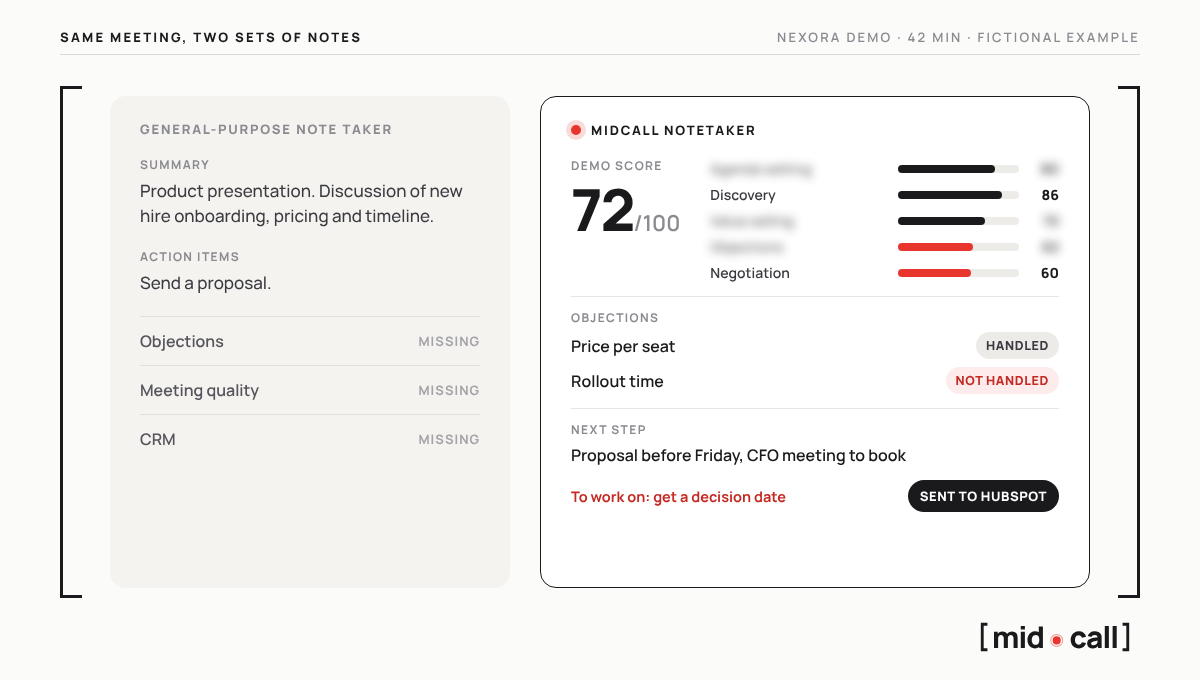
Take a fictional 42-minute demo with a prospect called Nexora. A general note taker writes a summary, product presentation, discussion of onboarding, pricing and timeline, and one action item, send a proposal. Midcall scores the demo 72 out of 100, skill by skill. It shows that the rep handled the price-per-seat objection but not the one about rollout time, captures the next step, a proposal before Friday and a meeting with the CFO to book, flags what to work on next time, getting a decision date, and sends it all to HubSpot. The first set of notes tells you the meeting happened. The second tells you what to do to move the deal forward.
With the Live Coach plan, that rollout objection gets handled while the prospect is still there. Midcall reads what is actually happening in the meeting, tells a smokescreen from a real objection, prompts the right question, tracks qualification against your team's framework and reminds the rep to lock the next step before the call ends. Each rep gets help where they need it, based on their own weak spots, not a generic playbook.
Setup takes 5 minutes. You connect your Google or Outlook calendar and your CRM if you have one, and Midcall joins your next meeting. Sales teams in B2B SaaS, training, agencies and consulting already use it. Our Otter vs Midcall comparison goes through every difference.
What are the best Otter alternatives for sales?
For a sales team, Midcall is the most complete Otter alternative, since it is built for sales from the ground up. Fireflies and Fathom are the other general note takers people compare with Otter, and both keep their sales features on their higher plans. Our ranking of the best AI note takers for sales teams compares them feature by feature.
Edward, co-founder of Midcall. Former AE, co-founder of Meteor, a B2B prospecting agency. I write about what actually happens in sales meetings, and what the best teams do with it.
Frequently asked questions
How much does Otter.ai cost per month?
Otter Pro costs $8.33 per user per month with annual billing or $16.99 billed monthly. Business costs $19.99 per user per month billed annually or $30 billed monthly. Basic is free, and Enterprise is on custom quote.
Is Otter.ai free?
Yes, Otter Basic is free, with 300 transcription minutes a month, conversations capped at 30 minutes, 3 file imports and access to your 25 most recent conversations.
What is the difference between Otter Pro and Business?
Pro is for solo users, with 1,200 minutes a month and conversations up to 90 minutes. Business is for teams, with conversations up to 4 hours, admin tools, more AI questions and up to 25 seats according to Otter's pricing page.
Does Otter have a free trial?
Otter's sales pages mention a 7-day free trial of the Business plan. The free Basic plan also lets you test transcription with no time limit.
Which Otter plan includes sales features?
Enterprise. The Sales Notetaker, which flags objections and pricing discussions, and Live Assist, which shows tip cards from your playbook during the call, are reserved for that plan, on custom quote.
Does Otter integrate with Salesforce and HubSpot?
Yes, Otter syncs its notes with Salesforce and HubSpot from the Pro plan, with CRM sync extended to more users on Business and full field mapping on Enterprise.
Is there an Otter discount for students?
Yes, students with a .edu email address get 20% off the Pro plan.
See the live AI coach on one of your calls.
15 minutes. We plug Midcall into a real scenario from your team, you decide.