How do AI meeting notes work, and which tool should you use?

There are 2 ways to get AI meeting notes, the AI built into Teams, Google Meet or Zoom if you pay for the right license, or a dedicated tool that joins your meetings. If you sell, the first one misses the real problem. Deals are decided during and between calls, no manager can listen to all of them, and Midcall, a conversation intelligence platform for sales, tells you after every call which objection went unanswered, where the deal stands and what to fix, then helps the rep during the call itself.
We went through the official Microsoft, Google and Zoom documentation in November 2026 to lay out what each built-in option requires, what it produces and where it stops. Then we look at what a generic summary misses when the meeting is a sales call.
How does AI take meeting notes?
An AI meeting notes generator runs the same 3 steps every time. It captures the audio, turns it into a transcript, then asks a language model to pull out a summary and action items.
- Recording. The video platform records the meeting itself, or an assistant joins as a participant. No recording or no transcript turned on means no notes.
- Transcription. Speech becomes text, tagged with who said what. This is where most errors creep in, on names, numbers and who gets credit for a sentence.
- Summary. The model reads the transcript and writes the key points, decisions and next steps. The output is only as good as the instructions behind it, and instructions written for a team standup cannot make sense of a negotiation.
That last step is where tools really differ. Recording and transcription are commodities now. Knowing what to look for in the conversation is not.
What is the difference between AI meeting notes, minutes and a summary?
An AI meeting summary is a few lines on what was discussed. AI meeting notes add the decisions, action items with owners and the next meeting. AI meeting minutes are the formal version, closer to a record of who attended, what was proposed and what was approved, the kind a board or a committee keeps on file. Most built-in tools produce something between a summary and notes. For the structure of good notes and a template to copy, see our meeting notes template and guide.
The need is real. In Microsoft's 2023 Work Trend Index, a survey of 31,000 people across 31 markets run in early 2023, 56% said it is hard to summarize what was discussed in a meeting, and 55% said next steps are unclear when a meeting ends. AI notes that do not fix those 2 problems are not worth much.
Which AI meeting notes are built into Teams, Google Meet and Zoom?
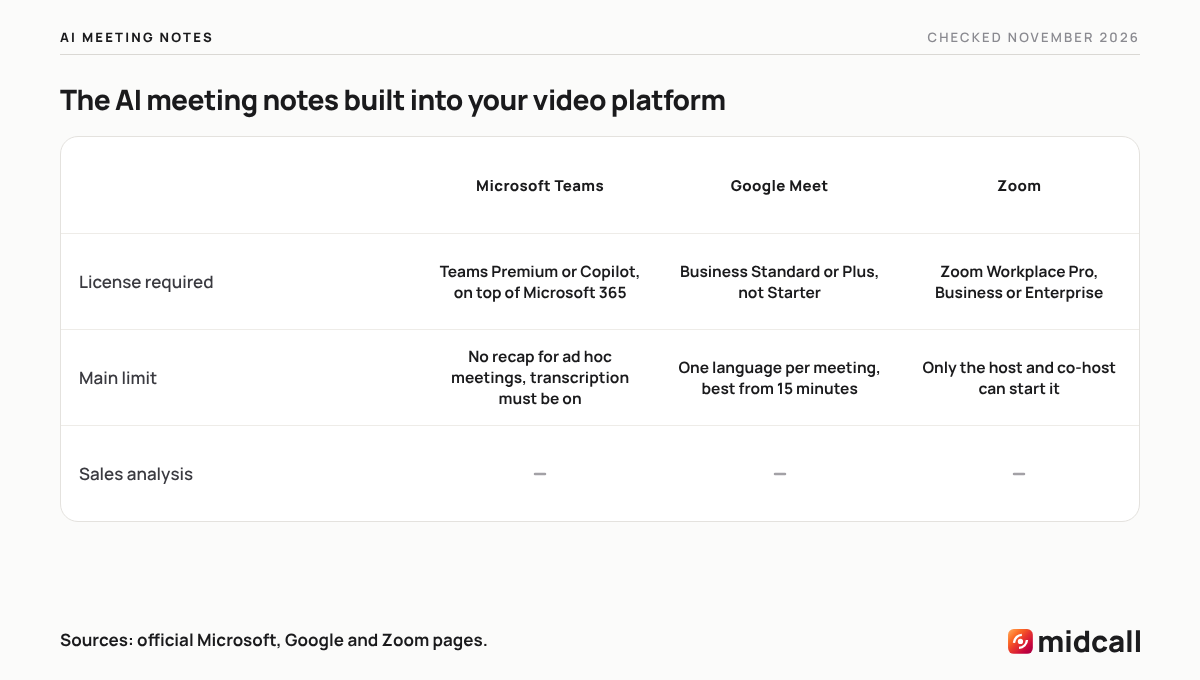
All 3 major video platforms now summarize meetings, and none of them does it on the entry plan. Teams needs Teams Premium or Copilot, Google Meet needs Business Standard or higher, and Zoom keeps its meeting summary for paid Zoom Workplace plans. Here is what their official pages say.
| Microsoft Teams | Google Meet | Zoom | |
|---|---|---|---|
| Feature name | Intelligent recap | Take notes for me (Gemini) | Meeting summary |
| License required | Teams Premium or Microsoft Copilot, on top of a Microsoft 365 plan that includes Teams | Workspace Business Standard or Business Plus, not Business Starter | Zoom Workplace Pro, Business or Enterprise |
| What you get | A recap with action items, AI notes, and chapters and speakers when the meeting is recorded | A Google Doc with quick notes (summary and action items) and full notes | A summary the host chooses to share with attendees |
| Languages | English, French, Spanish, German and more | 8 languages, one language per meeting | Several languages, per Zoom's help center |
| Main limit | Transcription must be on, and no recap for ad hoc meetings | Recommended for 15 minutes to 8 hours, may be incomplete below that | Only the host and co-host can start it, not available in breakout rooms |
Microsoft Teams intelligent recap
According to Microsoft's documentation on intelligent recap, you need a Microsoft 365 plan that includes Teams plus either a Teams Premium or a Microsoft Copilot license. Transcription has to be enabled by your admin policy, and the meeting has to be recorded for the full experience, otherwise the recap comes without chapters, speakers or topics. Microsoft's support pages add that the meeting must run at least 5 minutes, that ad hoc meetings get no recap, and that only people in your organization who were invited can open it. A manager who was not invited to a rep's call cannot see the recap, while in Midcall the manager sees notes for the whole team.
Teams Premium is a paid add-on billed annually on top of a paid Teams license, and Copilot Business is a separate add-on that requires an eligible Microsoft 365 Business license. Microsoft publishes prices by region, so check the Teams Premium page for yours. On the French price list we checked, Teams Premium comes to €8.70 per user per month before VAT.
Google Meet "Take notes for me"
In Google Meet, Gemini's "Take notes for me" creates a document in the organizer's Drive, attached to the calendar event, with a quick notes tab (summary and action items) and a full notes tab. It works in 8 languages, English and French included, but only one at a time, and not when speakers switch between languages. Google recommends it for meetings of 15 minutes to 8 hours and warns that summaries can be incomplete or inaccurate below 15 minutes.
The organizer is the one who needs an eligible edition. Google's Business editions pricing page lists the feature in Business Standard and Business Plus, not in Business Starter. So when your prospect sends the Meet link, their edition is the one that counts, not yours. If they are on Business Starter, there are no notes at all, and otherwise the document lands in their Drive, not in yours and not in your CRM.
Zoom meeting summary
Zoom's help center article on meeting summary requires a licensed user on Zoom Workplace Pro, Business or Enterprise. Only the host and co-host can start or stop it, the host decides who receives it, and only attendees signed in to their Zoom account get it automatically. It is not available in breakout rooms. When your prospect hosts, they decide whether you get the summary at all.
On its comparison page, Zoom says paid plans include its core AI features at no extra cost, with Zoom Workplace Pro starting at $14.16 per user per month.
Can you get AI meeting notes for free?
Not from the video platforms. None of the 3 documents AI meeting notes on its free or entry plan. Teams needs an add-on license, Google Meet leaves out Business Starter, and Zoom's help center does not list the free Basic account among the plans that get meeting summary. Microsoft does offer a 1-month Teams Premium trial, with a credit card.
That leaves 2 routes. You can export the transcript and paste it into a general AI assistant with a prompt asking for a summary. It works for a one-off meeting, but you repeat the process every time and nothing gets filed anywhere. Or you can try the free plans of general AI note takers, which almost always cap the number of meetings, the length or the features. We break those down in our ranking of the best AI note takers for sales teams.
For a sales team, the real cost is not the summary. It is the deal you lose because nobody noticed the budget objection never got an answer.
Why isn't a generic AI summary enough for a sales call?
A generic summary tells you what was said. After a sales call, a rep and their manager need something else. Was it a good call? Which objections went unanswered? Who signs, with what budget, and by when? Where does the deal stand, and what goes into the CRM? The official Teams, Google Meet and Zoom pages we read describe none of these sales features, no call score, no objection tracking, no qualification criteria and no push to a CRM. In practice, the unanswered budget objection disappears into a 3-line summary, the rep makes the same mistake on the next call, and the manager only finds out when the deal slips.
The time cost is well documented. In the 5th edition of Salesforce's State of Sales, based on a 2022 survey of more than 7,700 sales professionals, reps spent only 28% of their time actually selling, with most of the rest going to deal management and data entry. A summary you still have to reread, fill in and copy into the CRM does not give that time back.
Then there is consistency. An AE jumps from a Teams call with an enterprise account to a Meet with a startup, then to a Zoom with a prospect overseas. With built-in tools, each set of notes depends on the organizer's license, lands in their Drive or OneDrive, and comes in a different format. The history of a single deal ends up scattered.
What should you check before sharing AI meeting notes?
Reread AI notes before they go out. The vendors say so themselves. Microsoft warns that AI-generated content may be inaccurate or incomplete, and Google gives the same warning for short meetings.
- Tell attendees the meeting is being recorded. Google Meet notifies everyone when note taking starts, but with a prospect, a quick heads-up at the start of the call is still the norm.
- Check names. On Zoom's official community, a user reported a summary that gave one attendee another person's name, and Zoom replied that speaker recognition has limits.
- Check numbers and dates. A budget, a seat count or a signing date transcribed wrong throws off everything that follows in the deal.
- Confirm decisions. A summary can turn a "let's revisit that" into a commitment. Confirm what was agreed in writing, in your follow-up email after the sales call.
For the recording side, our guide to sales call recording software covers how sales teams set it up.
How does Midcall take notes on a sales call?
Midcall does not stop at a summary. It is a conversation intelligence platform built for sales, and the only tool that brings together note taking, conversation intelligence and live coaching, set up in 5 minutes. Its assistant joins your Google Meet, Microsoft Teams and Zoom meetings as a participant, records, transcribes in any language and identifies each speaker from their own audio stream. Here is what that changes for a rep and their manager.
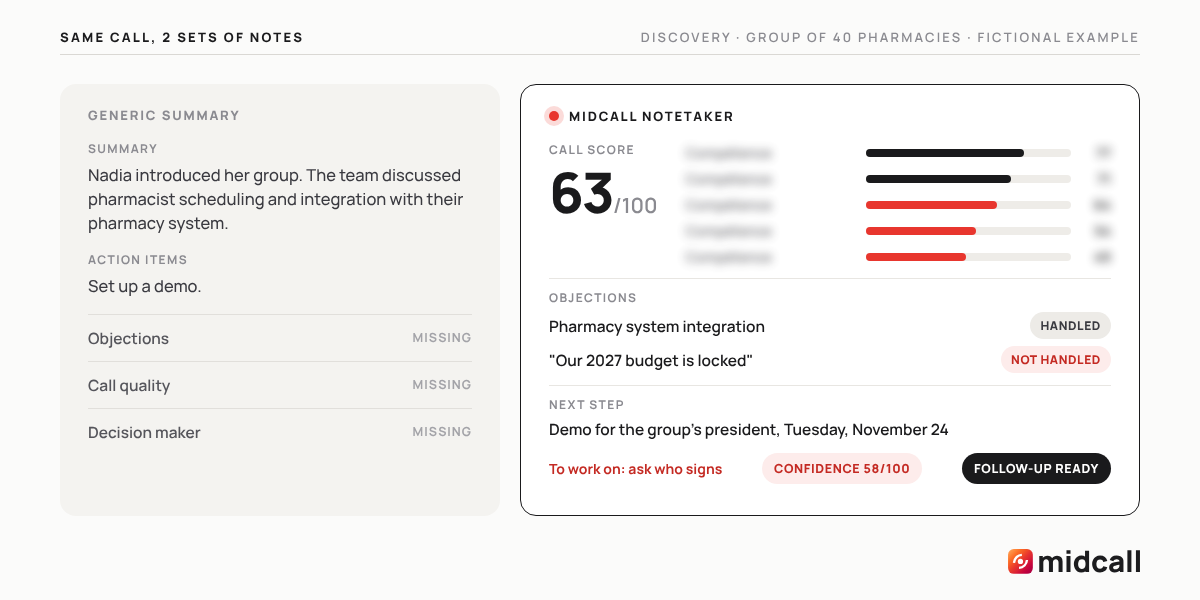
Take Ben, a fictional AE at a company that sells staff scheduling software to pharmacy chains. He just finished a discovery call with Nadia, VP of operations at a group of 40 pharmacies. The generic summary is 3 lines long. Nadia introduced her group, the team discussed pharmacist scheduling and integration with their pharmacy management system, and a demo should be set up.
A few minutes after the call, Midcall's notes on the same meeting tell a different story. The call scores 63 out of 100. Ben handled the integration objection well, but he let "our 2027 budget is already locked" slide without digging in. He never asked who signs off at the group level, which shows up as a skipped qualification criterion. The next step is a demo for the group's president on Tuesday, November 24, and the follow-up draft is ready. Before that demo, Midcall surfaces what is still open to help Ben prepare, and the deal confidence score reads 58 out of 100.
On Monday morning, Ben's manager opens Midcall before the team meeting. She sees each rep's scores for the week, the objections that come up most, and that Ben keeps letting budget objections slide without digging in. She knows what to work on in their one-on-one and which deals on the team need her, without reading a single summary or replaying a minute.
With the Live Coach plan, the call itself plays out differently. When Nadia says the 2027 budget is locked, Midcall tells Ben in real time whether it is a genuine objection or a brush-off, and suggests the question that gets her to say what she really needs. It tracks qualification against your framework, from BANT to MEDDIC or SPICED, and reminds Ben to ask who signs and to book the next step before the meeting ends. Each rep gets help tuned to their own weak spots. It is the most powerful live sales coach on the market.
| Summary built into Teams, Meet or Zoom | Midcall | |
|---|---|---|
| The notes | Summary, key points and action items | Sales call notes, next steps, every objection raised and whether it was handled |
| Call quality | Not described on their official pages | A score out of 100 for each skill, with the rep's strengths and areas to improve |
| What got missed | Not described | Blind spots, from weak skills and weak product knowledge to qualification criteria the rep skipped |
| Deal tracking | One document per meeting, owned by the organizer | Memory from one call to the next, and a built-in pre-CRM with a page per account and a deal heat score |
| CRM | No push described | HubSpot, Salesforce or Attio, one-click push or automatic sync depending on the plan |
| Follow-up | Not described | A follow-up email draft to copy or open in Gmail or Outlook |
| Sales manager | Has to read every summary | Sees what is said in every call on the team without replaying anything |
| During the call | No sales guidance described | Live Coach guides the rep in real time, as an add-on |
Setup takes 5 minutes. You connect Google Calendar or Outlook, your CRM if you have one, and Midcall joins your next meeting. From there, you can ask anything about a call, a deal or a rep, in Midcall or from Claude and Codex through MCP. Teams in B2B SaaS, training, consulting and agencies already use it, and our page for sales managers walks through the manager view.
Midcall costs more per user than a summary bundled into a video license, because it does a different job. Zoom Workplace Pro starts at $14.16 per user per month. Midcall's Notetaker offer starts at $35.99 per user per month, with every call scored, deal memory, blind spots, Ask anything and one-click CRM push. That is about $22 more per rep per month, less than what a single botched meeting costs you. A video recap tells you budget came up. Midcall tells you the budget objection went unanswered and nobody asked who signs, so the rep fixes both in the follow-up before the buyer goes cold. The manager coaches on facts instead of reading summaries. To equip a whole team, Midcall quotes by seat count, and the Midcall pricing page has every detail.
Which AI meeting notes tool should you use?
If you sell, go with Midcall. You get notes that tell you whether the call went well, what is still open and where the deal stands, on Meet, Teams and Zoom, filed in your CRM, with a follow-up ready to send, and your manager knows where to coach without replaying anything. The AI built into Teams, Meet or Zoom covers an internal meeting if you already pay for the license, but none of it reads a sales call, and Midcall can join your internal meetings too, depending on your settings.
Edward, co-founder of Midcall. Former AE, co-founder of Meteor, a B2B prospecting agency. I write about what actually happens in sales meetings, and what the best teams do with it.
Frequently asked questions
What is the best AI for meeting notes?
If you sell, use Midcall. After every call on Meet, Teams and Zoom, it produces sales notes with a score for each skill, objections handled or not, blind spots, the next step and a push to your CRM. The AI built into video platforms, Teams intelligent recap, Gemini note taking in Google Meet or Zoom meeting summary, summarizes an internal meeting if you have the license, but does not read a sales call.
Is there a free AI meeting notes generator?
Not from the video platforms. Teams needs Teams Premium or Copilot, Google Meet leaves out Business Starter, and Zoom's help center ties meeting summary to paid Zoom Workplace plans. General AI note takers have free plans, almost always capped on the number of meetings, the length or the features.
What license do you need for Teams intelligent recap?
Microsoft lists a Microsoft 365 plan that includes Teams plus either a Teams Premium or a Microsoft Copilot license. Transcription must be turned on, the meeting must be recorded for chapters and speakers, and ad hoc meetings get no recap.
How do you get AI meeting notes in Google Meet?
Use Gemini's Take notes for me, which requires the organizer to be on an eligible edition such as Business Standard or Business Plus. The notes land in a Google Doc in the organizer's Drive, attached to the calendar event, and Google recommends the feature for meetings of 15 minutes to 8 hours, in one language at a time.
Is Zoom's AI meeting summary free?
Zoom's help center says meeting summary requires a licensed user on Zoom Workplace Pro, Business or Enterprise, and does not list the free Basic account. Only the host and co-host can start it, and it does not work in breakout rooms.
Are AI meeting minutes accurate?
They get the gist right, but they need a review. Microsoft warns that AI-generated content may be inaccurate or incomplete, Google says summaries of meetings under 15 minutes may be incomplete, and Zoom acknowledges limits in speaker recognition. Check names, numbers and decisions before sharing them.
Do you have to tell people an AI is taking notes?
Yes. Let attendees know the meeting is being recorded, especially a prospect, with a quick heads-up at the start of the call. Google Meet notifies attendees automatically when note taking starts, and an AI assistant shows up in the participant list.
How much does Midcall cost for sales call notes?
Midcall's Notetaker offer starts at $35.99 per user per month, with every call scored, deal memory, blind spots and CRM push. To equip a whole team, Midcall quotes by seat count, and Live Coach is priced on request.
See the live AI coach on one of your calls.
15 minutes. We plug Midcall into a real scenario from your team, you decide.